Into the Cloud Conclusion – Securing Applications

Introduction

Applications need to be developed primarily with security in mind.  A lot of things are involved but I will focus on two things in this blog post:

  1. We need to know which actors are using our system.
  2. We need to expose features only to users that need them, and have privilege to access them.

The first one deals with authentication – granting a user some sort of trusted credential (like an ID card). The second one deals with authorization – granting that credential a set of entitlements.

Architecture

In the diagram below, we will be authenticating users through Amazon Cognito. Cognito will be configured to authenticate through three methods:

  1. Using local amazon user pools (users signing up though our app)
  2. Using facebook (users signing in through their facebook login)
  3. Through google (users accessing the app with their google account).
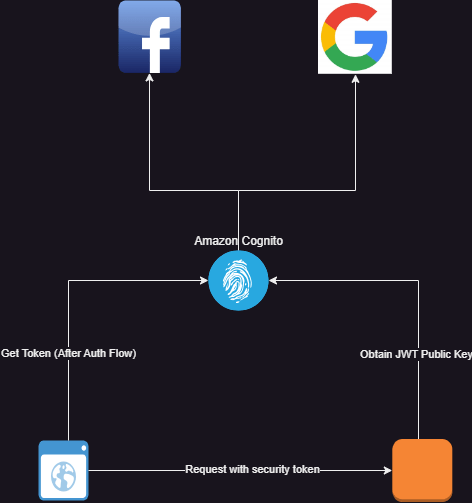
Security architecture showing integration with Amazon Cognito using facebook and google identity providers

Standards

Like I stated in my earlier posts, it is important to design a security architecture that leverages standards so that it can be interoperable with other systems. We used the OpenID protocol. This made it easier to integrate using Angular Auth OIDC Client for the user interface and Spring Security Oauth2 library for the backend.

Authentication

How can we trust that the token passed to the backend service comes from the user instead of a malicious client? How do we identify the user from the token? How do we ensure that the right token is delivered to the client for use?  How do we ensure that users have a good user experience when logging in to the application? These are the questions you need to ask yourself when designing an authentication system.

Gaining access to the System and Single Sign On (SSO)

We implemented authorization code grant flow using (PKCE) on the angular user interface. The authorization code grant type flow redirects login to the authorization provider (Amazon Cognito in this case). The login and signup forms are served by Amazon Cognito. This means that the user’s sign in and signup experience can be customized by changing the Cognito configuration. A few things can be achieved:

  1. Sign-in though external identity providers like Facebook, Google and other OpenID providers
  2. Sign-In through SAML providers.
  3. Enabling multi factor authentication according to the security requirements of your application.
  4. Configuring the session properties like access token validity period, session time, validity of refresh tokens and so on.
  5. Determining what user info is needed
  6. Styling the sign up and login pages.

Signing in through external identity providers help you to login to multiple applications without signing in. For example, once I have logged in to my google account, by clicking the google login, I do not need to enter my user name and password again. This approach provides a seamless way for users to access applications.

One of the major security vulnerabilities of the authorization code grant flow is that the code returned by the authorization server can be intercepted and a malicious actor can use that code to obtain an access token on behalf of the user. This is because public clients are normally used with authorization grant type and no client secrets are used. A common way to mitigate this is using Proof of Key for Code Exchange (PKCE). Most OpenID clients (including angular-auth-oidc-client) and authorization providers (in this case Cognito) support this. This method prevents interception because:

  1. Before the redirect is made to the authorization provider, the client generates two cryptographically related tokens: the code challenge and the code verifier.
  2. Only the client knows these token pairs and their relationship can be validated using cryptographic algorithms.
  3. The client adds the code challenge to the authorization request and the authorization server keeps track of the code challenge by associating it with the request along with the generated authorization code.
  4. The client is required to pass the authorization code and the code verifier in order to obtain the access token. Since only the client knows the verifier, no malicious user can obtain the token without the verifier.
  5. The authorization server validates the relationship between the challenge and the verifier using the selected cryptographic algorithms.

Benefits of using OpenID

In this application, the front end and backend strictly integrates with Amazon Cognito using the OpenID protocol. Because of this:

  1. I can reuse established open id libraries without re-inventing the wheel
  2. I have a solid foundation on the security flow since the protocol is well documented
  3. I can switch authentication providers and use others like Keycloak or Okta without implementation code changes.

Proof of Identity

Once the client makes a token request with a valid authorization code and code verifier, Amazon Cognito issues three tokens:

  1. An access token
  2. An identity token
  3. A refresh token.

These tokens are cryptographically signed by Cognito using public-key cryptography as per the OpenID standard using the JWT specification. In this specification:

  1. The authorization server maintains a key pair. A private key (kept secret by the authorization server) that it uses to sign generated tokens and a public key that it exposes for resource servers to retrieve.
  2. The client attaches the access token to a request.
  3. The resource server validates the request by validating the signature of the token using the public key.

In short, proof of identity is established based on trust. If the resource server can confirm that the token comes from the authorization server, then it trusts that information. The token is a JWT token that contains claims that identify the client. One of those claims is the username claim that contains the user id of the user.

Authorization

Once the identity of the actor has been established, the system needs to know the capabilities of the actor. What is this user allowed to do on this system? This is implemented in different ways in different systems. There are two aspects of authorization:

  1. Obtaining the user entitlements
  2. Enforcing the user entitlements

Both aspects can be taken care of by the same, or different authorization systems. Once practice I find useful is to de-couple authentication from authorization because you will, most likely, not use the same solution for both and you do not want to be tied down to a solution because you cannot isolate them in your logic.

In my case, I am only using Cognito for authentication. Cognito has a native integration with Amazon Verified Permissions which handles the above two aspects through authorization policy configuration and enforcement. Because I isolated both in my design, I am free to start with a much simpler authorization system using database based role-based-access control. In future, if I want to use something more elaborate like the Amazon Verified Permissions, I can easily integrate.

Like I said in the begining of the Authorization section, authorization behaviours fall into two categories:

  1. Those that handle 1 and 2 together, all you have to do is simply ask the authorization server the question “does the user have access to this resource?”
  2. Those that handle 1 and expect that you handle 2. They provide you with the list of the user’s entitlements and it is up to you to enforce that.

I am currently using the second approach, retrieving the user’s entitlement from the database.

Backend Authorization

Being a spring boot service, authentication and authorization are handled using spring security. I implemented a custom granted authority resolver. This is an implementation of spring’s Converter interface that converts a JWT token to a collection of granted authorities.

public class AppJwtGrantedAuthorityResolver implements Converter< Jwt , Collection<GrantedAuthority> > {

@Override
publicCollection<GrantedAuthority>convert(Jwtsource){
…
 }
}

}
 

Spring security already has APIs that help you to enforce access based on what entitlements the user has. So I can configure things like:

  1. Users can only have access to the GET ‘/hymns’ endpoint if they have the ‘hymns.view’ permission.
  2. Users can only have access to the POST ‘/hymns’ endpoint if they have the ‘hymns.create’ permission.

Front-end Authorization

Front-end authorization follows the same approach as backend but in this case, instead of restricting apis, we restrict the following:

  1. Access to pages on the app
  2. Visibility of components
  3. Functionality (enabling or disabling) of certain features or components.

These can be achieved in angular by:

  1. Implementing route guards
  2. Using entitlement based directives
  3. Using conditional statements applied to templates.

NOTE: It is advisable to implement both server and client size authorization.

Back to Amazon Verified Permissions

Amazon Verified Permissions is a user authorization service newly introduced by amazon that enables you to define flexible authorization rules that specify when and how much access a user has. These rules are defined using the open source Cedar language for specifying access control.

Like I said earlier in this post, as a resource server, you ask Amazon Verified Permissions if a user has access to the intended request. This service takes that authorization request, passes it though a set of rules you defined using the cedar language, and responds with an ALLOW or REJECT response.

This approach is extremely flexible and allows you to specify access rules based on any user and request criteria. Application teams can configure their access requirements in a manner that helps them efficiently manage access controls.

One drawback is that calls has to be made to the authorization API for every request and this can be costly and inefficient. This can be mitigated by:

  1. Caching the authorization decisions
  2. Batching authorization requests for multiple functionalities using the batch authorization API.

Secret Management

I cannot conclude without talking briefly about how to manage secrets. Database and private key credentials need to be stored securely to avoid malicious users gaining access to your system. The AWS Systems Manager provides a parameter store that enables you to store different parameters including secrets. This stores secrets as SecureStrings that are encrypted using the default AWS managed encryption key or a customer managed encryption key that you can manage. Encryption keys can be created using the Amazon Key Management Service.

Using the default AWS managed key is free, but you can only access the secret from within the account, using AWS APIs. If you need more flexibility and you want to share secrets with multiple AWS accounts, you will need to create a customer managed key, and of course, this is not free.

The EC2 Journey Unfolds – Routing Traffic

Introduction

In my earlier article I discussed my experiences with the Amazon EC2 instance. I also talked about the VPNs and security groups that are needed to set up the network at which the EC2 virtual machine resides. Today, I will detail my approaches to getting network traffic to the virtual machine.

Routing Architecture

Routing Architecture

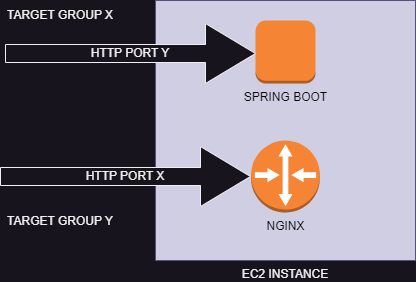
In my simple scenario, I am using the same EC2 instance to host my Nginx router (which serves my Angular resources for the front-end) and the Spring Boot service which runs the Hymns API. The Nginx server listens to port X and the spring boot service listens to port Y. Both service use the HTTP protocol.

Target Groups

Target groups are what AWS uses to know where to route traffic to. After AWS determines the IP address, it need to know which port and protocol to use to send the data packets. This is what a target group provides.

The Big Picture

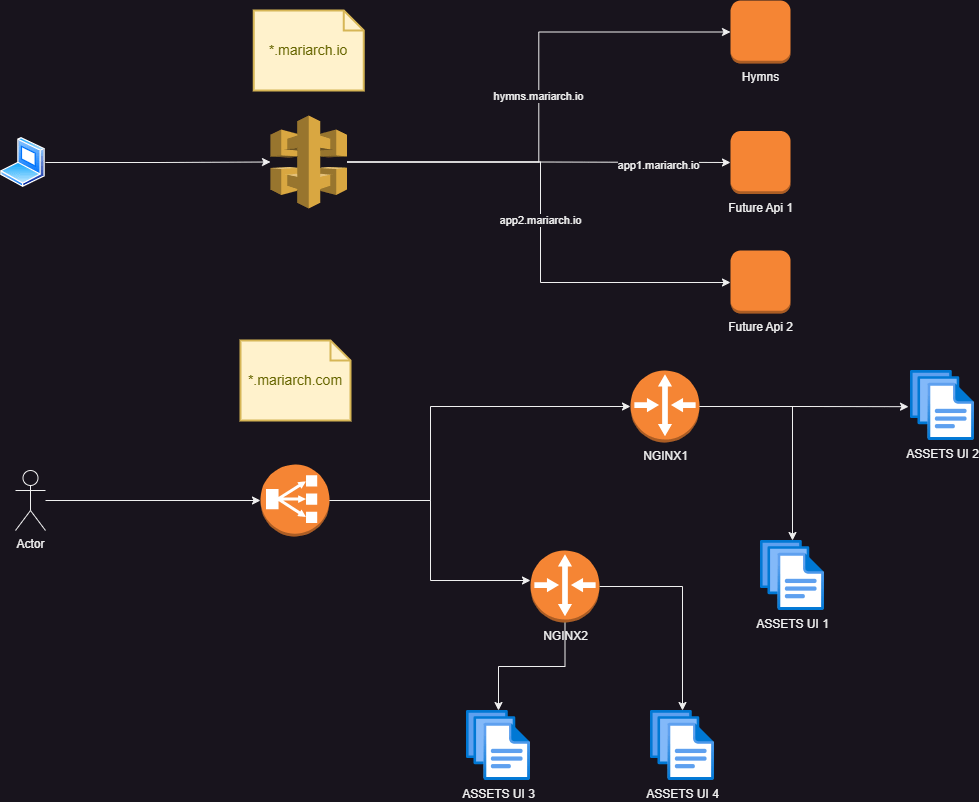
I plan to build many applications in future, as well as APIs that other developers can use to collaborate with. I will be using mariarch.com to serve web applications and pages, and mariach.io to serve collaboration APIs. Although the routing solution I will start with will be simple, I will have to bear this in mind so that my system can evolve appropriately.

The routing big picture. This shows how user interface and backend traffic will be routed.

Flow for API Traffic

  1. Client makes an API call
  2. The request reaches an API gateway
  3. The API gateway routes the requests based on the sub-domain to the required target group
  4. The request reaches the target group.

Flow for User Interface Traffic

  1. Client loads a page on the browser
  2. Requests from the browser are received by a load balancer
  3. The load balancer routes the request based on domain to the required target group
  4. Target groups define the port and protocol that an Nginx server listens to
  5. An Nginx server can be configured to host multiple applications and will contain rules to serve the correct asset based on the subdomain used in the request
  6. The Nginx server returns the requested access.

Api Gateways with Amazon API Gateway

This is by far the most feature backed approach to take and also, not the simplest to configure. AWS provides two categories of HTTP traffic routing that you can use: The HTTP api and the REST api. I was initially confused as to the difference between these two offerings and, on studying the documentation of these features I got to understand their peculiarities. I will briefly summarize them below.

HTTP APIs only provide basic routing and you can create APIs based on region. You can configure these apis to use Mutual TLS authentication (HTTPS), and authorize using IAM, amazon cognito, custom authorization using AWS lambda functions and JWT tokens.  You can also use custom domains on these APIS.

Rest APIs build on all the features of HTTP APIs and they can be edge-optimized and private. You can set up these apis to use certificate authentication or authenticate using AWS’s custom WAF (Web Application Firewall). You can also configure resource polices to achieve fine grained authorization. Also, you can create API keys that your API clients will authenticate with and enforce rate limiting and throttling per client. Please see the developer guide for more details about these two offerings.

Typical AWS Api Gateway Configuration

Typical AWS API Gateway configuration showing how the API gateway routes traffic to a target group through a network load balancer.

The typical way to configure AWS API Gateway is through a network load balancer. AWS provides a detailed guide on how to do this and I happened to follow the same with no issues.

Simple API Gateway Using Application Load Balancers

Using the AWS API gateway will surely give you the most flexibility and will enable you to achieve much more without writing code. But this requires an extra component which will eventually add to your overall costs. If you don’t require the features that the API gateway provides (like me at this point who only wants a simple routing by sub domain name), you can simply use an application load balancer. It enables you to specify basic routing rules. In my case, I am using the application load balancer to route traffic by domain name.

Routing traffic using application load balancers.

Network versus Application Load Balancers

AWS provides different categories of Load Balancers of which application and network load balancers are the recommended and most popular. Network load balancers route traffic at the network level (i.e it uses protocols like TCP and UDP). This means that the rules you specify here are network related. Application load balancers, on the other hand, route traffic on an application level (using protocols like HTTP, HTTPS, e.t.c). This enables you to route based on HTTP related criteria like path, headers e.t.c.

Transport Layer Security (TLS) and Certificates

Users will not trust you when you do not use https (I mean, I get skeptical when I navigate to a site without https). Even worse are HTTPS sites that are flagged with the dreaded “certificate invalid” or  “site not trusted” messages. These messages are related to the certificate used to establish the secure connections.

AWS API Gateways and load balancers allow you to listen to secure endpoints by associating a certificate with them. AWS gives you an easy way to create and manage public certificates. These certificates are signed by AWS certificate authority and will show up as a legitimately signed certificate (check hymns.mariarch.com which was signed by a public AWS certificate). Certificates provided by AWS are managed using AWS certificate manager. This services allows you to create public certificates for free and will not charge you for using public certificates. You can decide to associate multiple domain names to a certificate or use wildcards. Please note that when creating certificates with AWS certificate manager, you will be required to validate the sub-domains associated with those certificates. Again, AWS provides a detailed, step-by-step, process on how to do this which involves associating a few domain records to your domain. If your domain is managed by AWS using Route53, it’s much more easier.

One thing to note using AWS public certificates is that:

  1. They are signed by AWS Certificate Authority
  2. You can only access the certificate details
  3. You can not access the private key of the certificate.

This effectively means that you can not use these certificate to secure any component apart from those that are natively integrated to AWS certificate management (i.e API gateways and load balancers). I learned this the hard way when trying to route traffic directly to my EC2 instance (you don’t have access to private keys of these certificates to configure any deployed service like nginx for http).

AWS Private certificates give you much more control and freedom to use any Certificate Authority of your choice. It also gives you access to the private keys as well. And, as you guessed it, it is not free. Please see the AWS documentation for certificate management for more information.

Routing Traffic Directly to EC2 Instances

Like you know, this is the simplest approach because it does not require any extra component from AWS. We just need to:

  1. Add network rules to the security group to permit traffic from the IP addresses you want ( you can permit all, but this is discouraged)
  2. Run a service that listens to a particular port. The default port for http is 80, that for https is 443 (If you want your urls to be without a port, you should use these defaults).
  3. To use TLS, you will need to use an AWS private certificate or obtain a certificate from an external provider.

This option, on its own, is discouraged because that the network interfaces of the EC2 instances are exposed directly. However, this can be a viable option of you already have routing providers outside of AWS. In this case, your network rules should only allow traffic coming from these routing providers.

So interesting right? Now that I have looked at routing traffic, I will circle back to securing APIs using Amazon Cognito in the next post.

First Deployment Journey – Starting a Project with AWS

Background

For the past two weeks, I had two goals – to explore AWS and to launch my software development business. These two goals are similar in the sense that they involve delving into a deep abyss of unknowns with a lot of experiments. It has been an awesome journey so far and of course, I will keep you updated.

Overview

My first goal this past month was to kick of an online presence of my new business – Mariarch. This will involve launching a proof-of-concept introduction of an ambitious project, to curate all the catholic hymns in the world and give Catholics an easy way to discover and learn hymns as we travel around the world. (If this is something you are interested in, by the way, please drop me an email). The objective was to deploy an initial, simple version of this project with bare-minimum features. (You can check the application here)

Architecture

To tie this to my second goal, Mariarch Hymns (the name of the project), needed to be designed using AWS infrastructure.

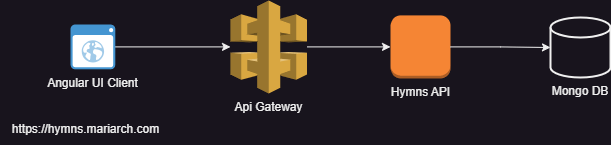
Initial architecture

The simplest way to have implemented this was a single server architecture with a server side UI framework like freemarker or to serve single page architecture UI clients from within the same server. This will consume the least resources. But since I have the vision of creating mobile applications and exposing these APIs for collaboration with other teams, it made sense to isolate the frontend from the backend implementation using Rest APIs.

Cheap as Possible is The Goal

AWS offers a reasonable free tier offering that I aim to leverage in this exploration and ensure that I spend as little as possible in this initial stage. While cost reduction is a goal, I will be designing in such a way that my application can evolve whenever its needed.

Avoiding Provider Lock-in

One of my core principles of design in this application is to avoid adopting solutions that will make change difficult. Because I am still in the exploratory phase, I need to be able to easily migrate away from AWS to another cloud provider like Azure or GCP if I ever decided that AWS does not meet my needs. In order to be free to do this, I had to ensure the following:

  1. Use open source frameworks and standards and tools where possible and avoid proprietary protocols. A good example is integrating my UI client with Amazon Cognito using the standard OpenID protocol as opposed to relying heavily on AWS Amplify.
  2. Integrating with secret management systems like AWS parameter store and AWS secret manager using a façade pattern to ensure that other secret providers can be easily integrated to the application system.

Software Stack

  1. Angular 18
  2. Java 21
  3. Spring boot 3.3.2
  4. Nginx
  5. AWS
  6. Mongo DB

Mongo V Dynamo DB

I’m pretty sure you are wondering why I chose Mongo DB as opposed to Dynamo DB since I am exploring AWS infrastructure. Dynamo DB is not suited for applications with complex queries to the database. It is a highly efficient key value store. Hopefully I will get into more detail if I have a need for the Dynamo. Fortunately, AWS partners with Mongo Atlas to provide managed Mongo Atlas databases in the same AWS region.

EC2 – The Core

At the heart of AWS offering are its Elastic Cloud Computing systems it calls EC2 (I’m thinking C2 means cloud computing). These are simply virtual machines that you can provision to run your services. AWS provides a host of configurations that allows you to pick the operating system, resource and graphics requirements that you need. (I will not get in to that since AWS has an extensive documentation on this). AWS also provides the serverless version, ECS Fargate, that enables you to focus on our application code rather than the virtual machine. On a level above this,  containers can be deployed through Docker, Amazon Elastic Kubernetes Service, or Amazon’s provision of the Openshift Red Hat Version. For this purpose, I used the simplest, the EC2 Amazon Linux virtual machine (the free tier configuration).

The Amazon Linux virtual machine is basically a Linux instance tailored for AWS cloud infrastructure. It provides tools to seamlessly integrate with the AWS ecosystem. You could do this on any other image version by installing the corresponding AWS tools.

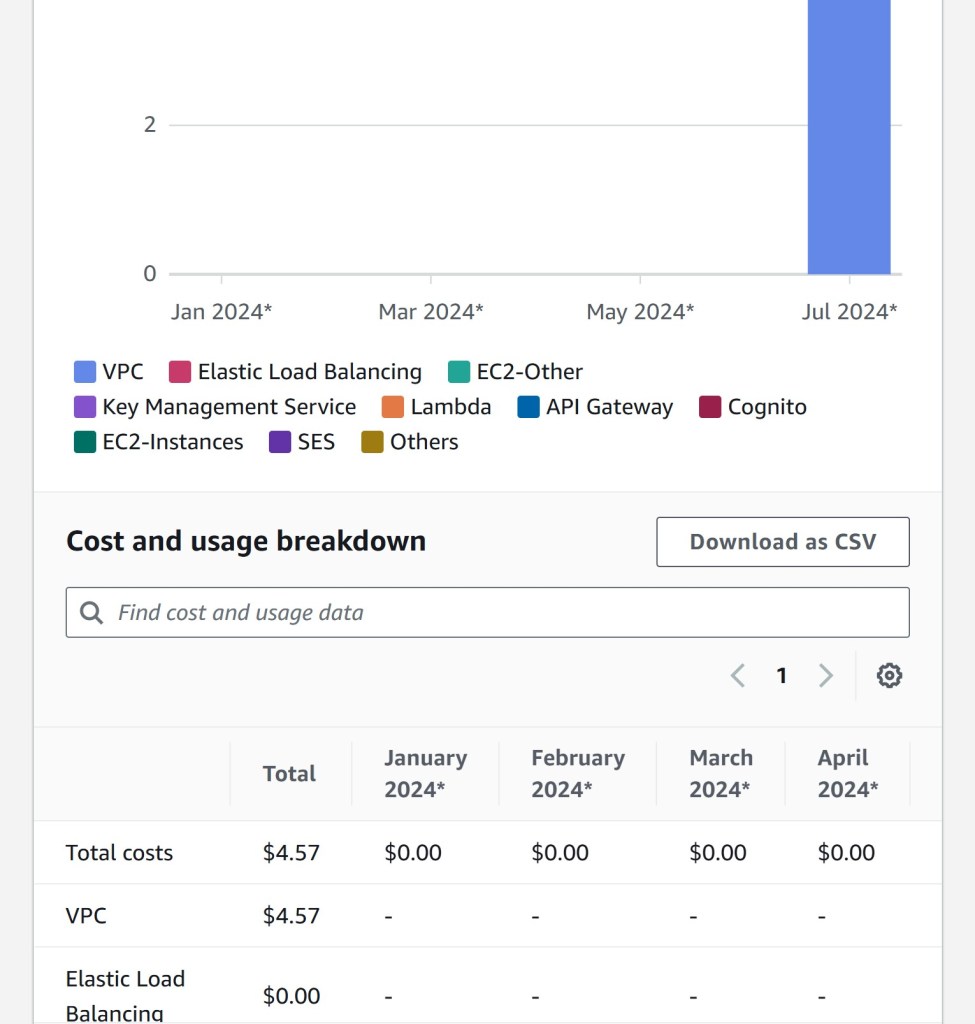
EC2 instances generally run in their own Virtual Private Cloud. This means that you cannot communicate with EC2 instances unless you add rules to grant access to specific network interfaces like protocols and ports. One interesting thing to note is that while AWS provides a free tier offering for EC2, it doesn’t for VPCs and you need a VPC for every EC2 instance. This means that you will spend some money running EC2 instances since they need to run within a VPC even if you are on the free tier. I have attached my initial cost breakdown for the first 2 weeks of use of AWS. We see that while I’m on the free tier and all services I use are still free, I still need to pay for the VPC.

Cost breakdown showing VPC expenses.

Securing EC2 Instances

A VPC is defined by its ID and a subnet mask. Subnet masks are what is used to decide what IP addresses are used for that network. EC2 allows you to configure security groups that define who gets to access what interface of the virtual system. Security groups are reusable. They allow you to define multiple network access rules and apply these rules to different AWS components like other EC2 instances or load balancers. A network access rule comprises of the following:

  1. A type (e.g. HTTP, SSH, e.t.c)
  2. A network protocol (TCP, UDP)
  3. A port
  4. Source IPs (These can be defined by selecting VPC ids, or entering subnet masks or IP addresses).

As a rule of thumb, always deny by default, and grant access to components that need that access. Avoid wildcard rules in your security group.

Another aspect of securing EC2 instances is granting the instance permission to access other AWS services. In my application, I needed to retrieve deployment artefacts from AWS S3 in order to install them on the EC2 instance. To achieve this, the EC2 instance needs to be able to pull objects from S3. As discussed in the previous post, AWS provides a robust security architecture that ensures that all components are authenticated and authorized before they can access any AWS service. This includes EC2 instances.

IAM Roles enable AWS components to access other AWS services.  EC2 instances can be assigned AWS roles. This ensures that the credentials corresponding to the assigned roles are available for processes to use in that virtual environment. In IAM, you can configure a set of policies to be associated with an IAM role. Please check out the IAM documentation for more details.

Routing Traffic to EC2 Instances

Because EC2 instances run in their own sandbox, they cannot be accessed externally without certain measures. In the next post will go through three basic approaches:

  1. Simplest – Exposing the EC2 interface to the outside world
  2. Using an application load balancer
  3. Using an API gateway and a network load balancer.

Into The AWS Cloud – Part 1: Workforce Security, Organizations and the Identity Center

Introduction

We spent our first weekend in July in Center Parcs Longford, Ireland; a truly exciting and fun filled resort (fun for the kids, I was just playing aggressive catchup). We did a lot of swimming and playing with water and so did a million other people. When we came home, we started feeling the effects of being exposed to different environmental conditions. I fell sick, my son fell sick… and I think it has only just begun. Perhaps if I had been a bit more vigilant and prepared for these conditions (if that was possible).

This is how the concept of security is. Most people think security is about “preventing bad actors from damaging our system”. Yes, that’s one aspect. But it also entails being vigilant and watchful. It involves guarding yourself from – surprisingly – yourself. The last point is crazy right? But think about it. How many of us has left their child alone and the child opens the window (imagine if the window doesn’t have a child lock). How many of us has accidentally deleted a resource or configured something that we have no business configuring? If we simply didn’t have that access, that would not have happened.

AWS was built with security in mind and that is one of the reasons it excels so much and can be used for mission critical and sensitive applications. In this blog, and the other blogs in this series, I will not be going through what AWS already has in its documentation – It has extensive and well-formed documentation and guides for all its services. Rather, I will be going through what I call the “spirit, essence and use cases” for these aspects. This will enable you to have a high level understanding of these concepts before perusing the documentation.

AWS Approach to Security

My approach is simple, since we are not perfect and we make errors (some mistakes, some malignant), we need to be vigilant and guard ourselves, keep track of these errors we make so we know how to fix and prevent them. AWS seems to think in the same vein and has developed lots of services tailored to all aspects of security. Some of their guiding principles are:
1. Audit – all actions any one or machine makes are logged and can be tracked.
2. Least privilege access – Customers, employees and services can be given access to only what they need, at the time they need it and nothing more than that.
3. Universal Identity and hierarchies – Identities are uniform and can be grouped in such a way that policies are applied and enforced uniformly.
4. Separation of customers from workforce – Authentication and authorization flows, while they are conceptually the same, are different for customers and employees. This enables security flows tailored to improving customer experience for customers.
5. Zero trust architecture – This ensures that the authorization of customers, employees and services are checked immediately before a resource is accessed.
6. Relationship between identity and billing – All users are directly tied to AWS accounts which are used by AWS for billing. Because of this relationship, it is easy to track what resources are being used by which AWS account.

Authorization Approach

AWS authorizes all requests before they are processed to achieve a zero trust architecture. In a typical flow:
1. The client logs in and is authenticated.
2. The client makes are request to access a certain resource
3. AWS obtains the security context of this request. This context contains everything about:
a. The user
b. The AWS account behind that user and its associated organization hierarchy
c. What the user is trying to access
d. The user’s privileges
4. AWS evaluates the security context against a set of policies. These are rules that specify whether to allow or deny a specific request. A policy contains the following:
a. The resource pattern (to match the resource uri of the request)
b. The action e.g S3:ObjectDelete ( to delete an object on S3)
c. Set of conditions (expressions that specify when this rule should be used)
d. The effect property (Whether to allow or deny a request)
5. In a list of polices to be executed, the first matched policy is used and the request is either “Allow”ed or “Reject”ed based on the value of the Effect property.

The policy syntax allows us to achieve the following kinds of restrictions:
1. Allow all S3 actions for resources starting with “project-a/” if the user’s project is “project-a”
2. Allow all S3 actions for all resources if the user’s role is SystemAdmin
3. Deny all S3 actions for all resources if the role is Accouting

Account and Billing

If you are thinking of using AWS, you likely belong to an organization; a startup; or you are an individual looking explore or develop something. The simplest use case is the individual working on a project. In this case the individual is the sole contributor and manager of that project. This user can simply create an AWS account and use this account to create and manage resources. However, in large organizations, it becomes tricky. Many organizations and businesses have different departments or sections each with their own budget and financial accounting requirements . Also these different departments may or may not use the same AWS services. Even if they use the same aws service i.e AWS S3, they will likely use different resources (i.e buckets in this case). In special cases, departments may even be required to share resources. AWS needs to provide a flexible, secure and transparent way of organizing these kinds of access requirements.

The unit of billing and resource ownership is the AWS account. IAM Users and Resources are created under an AWS Account. This is how AWS knows “who” to bill for certain resources. IAM users are created and associated to accounts. But these accounts can be grouped logically in a nested manner so that the organization can have a top-down overview of the expenditure of the organization. This is where AWS Organizations come in.

AWS Organizations enable us to use and manage multiple AWS accounts in the same organization. Multiple accounts can be grouped together so that polices can be administered uniformly on accounts in these groups.

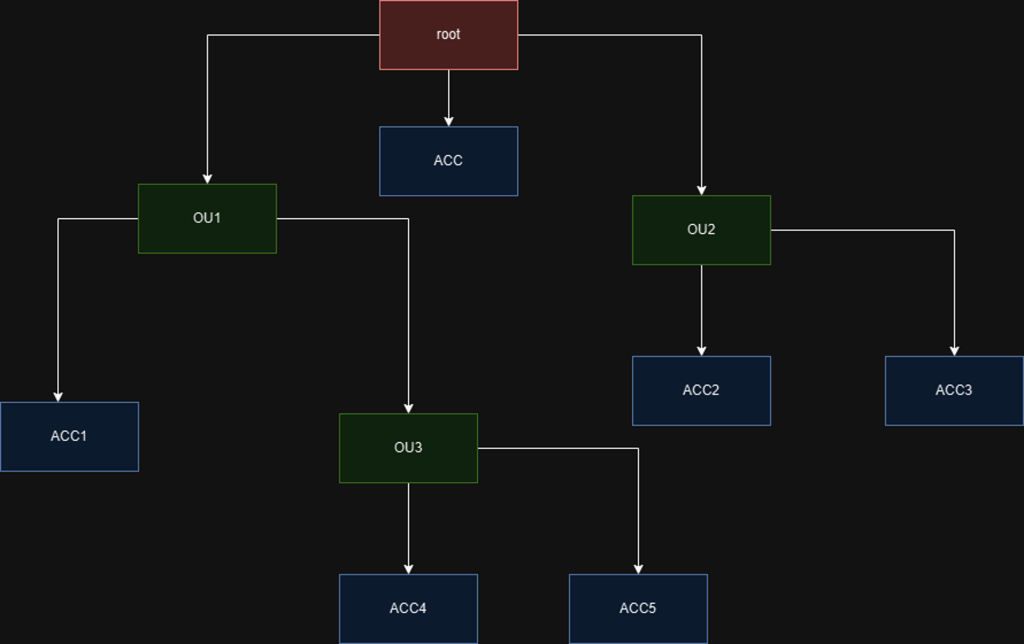
When you enable AWS Organizations, one organization is created for you called the “root”. You can create new AWS accounts or invite existing AWS accounts to this organization. One or more organization units can be created to group one or more accounts. An organization unit can comprise of multiple accounts and organization units.

Sample AWS Account Organization Hierarchy

In the example above, we created 3 organization units and 6 accounts.

  1. The organization unit OU3 has OU1 as parent
  2. The accounts are distributed to each organization unit (shown in blue)
  3. There is always going to be one account ACC that is directly associated with the root organization and this is the management account. The management account is ultimately where all bills go to but AWS categorizes the bills according to the individual account use.

In addition to billing, AWS organizations helps to ensure that each accounts can only use a specific AWS features. By defining service control policies (SCPs) and attaching these profiles to an account or organization unit, we are able to limit what AWS feature a particular account can use.  AWS has a lot of features and I am sure that organizations do not want all departments to be able to utilize all the features that AWS has to offer. What they typically would do is specify a list of features that a particular department can use. Once an account is granted access to these features then users can be created under these accounts and granted permissions to use those features.

For example, supposing ACC4 and ACC5 are only allowed to use AWS S3 ( I don’t know why I keep using this, but let’s just play along), we can define an SCP that grants access to only S3 service and attach this SCP to the OU3 organization unit. This way, both ACC4 and ACC5 accounts are restricted accordingly. If IAM users are created with ACC4, they will only be able to grant them S3 specific permissions. In detail:

  1. ACC4 can create an IAM User User 1 and grant permission to read from S3
  2. ACC5 can create an IAM User user 2 and grant permission to write to S3.
  3. ACC4 cannot grant User 1 a permission to access Amazon SNS because the SCP only allows using S3 permissions
  4. ACC4 cannot grant User 2 permission to access Amazon SQS because the SCP only allows using S3 permissions.

In addition to Service Control Polices (SCPs), other policies can be created and attached to organization units and accounts:

  1. AI services opt-out policies – control whether AWS AI services can store or use your content
  2. Backup policies – Enforce consistent backup plans
  3. Tag policies – Enforce a certain standard of tagging for all resources. You can define keys and their allowed values.

Identity and Access

There is a distinction between an AWS account and a User. Accounts are associated with resources and are used to create Users. In AWS, there are two kinds of users: root users and IAM users. Root Users are users automatically created and associated with the AWS account.

IAM Users are created in IAM or IAM Identity Center and these are associated to an AWS account. One or more IAM users can be created for an account. IAM Users are typically humans (organization staff) or machines that access any of the resources created in your account.

It is worth noting that AWS discourages the use of the root user for things that can be done with an IAM user with a correct privilege. They advise that the root user should be used for actions that only a root user can perform. The credentials for the aws account should be securely managed.

The IAM Identity Center enables administrators to manage IAM users and groups across the organization. These users have to be assigned the following:

  1. An associated AWS account
  2. One or more permission sets (specifying what the user can perform in that account).

Each permission set the user is assigned can be seen as a designated role. The Identity center provides a link to an access portal to enable users access the management console with any designated role. Assuming the user has the “developer” and “director” permission sets assigned, the user takes the following steps:

  1. Clicks on the portal link
  2. Enters the username and password
  3. The user is redirected to a page listing all the aws accounts the user has access to and the permission sets. The user can click on either “developer” or “director”. By clicking one permission set, the user is redirected to the management console and can use the management console as a “developer” or a “director”
  4. On the management console, the user can see which user and designated role is being used.

AWS also has a guide for this.

Conclusion and Thoughts

AWS has robust mechanisms for handling security and ensuring that you design your systems with security in mind. By using Amazon CloudTrail, you can monitor AWS account activity as well. AWS Organizations enable you to structure your accounts and billing to tailor that of your organization.

AWS has the IAM and the IAM Identity Center for managing access (i.e creating users, groups and assigning permissions). They are similar in use case and AWS advices to use the IAM Identity Center as much as possible because it facilitates configuring access at an organization level. This ensures that you have a uniform and transparent access enforcement system. With this, we can efficiently enforce access for our workforce.

To manage customer access, AWS provides AWS Cognito and AWS Verified Permissions. These two systems are so broad and powerful that they deserve their own section.

Into The AWS Cloud

Innovation is a constant phenomenon in or world today. In order to keep up with the speed of innovation businesses must be able to adapt quickly. One of the factors restricting businesses from evolving is IT infrastructure.

IT infrastructure comprises of everthing a business needs to survive in this digital age like email providers, servers, media storage, processing units, softwares, routers and so on. Businesses that manage their own IT infrastructure have to dedicate a percentage of their workforce to manage and evolve this infrastructure as the business grows. This task is especially cumbersome for lean businesses without the capacity to dedicate staff for this purpose.

With the advent of “the cloud”, more and more businessess choose to “outsource” all or part of their IT infrastructure so that it is managed by a separate company. This company ensures that computing and network resources are available and shared efficiently. These “cloud” providers now provide exact billing strategies that ensure that you only pay for what you use (as opposed to investing in a 16GB ram server and only use it for emails). These days, we find that it is more cost effective especially for lean businesses to move to cloud architecture and focuse on their core competencies.

In the following Sections, I will delve into the AWS cloud, exploring and reviewing the services they provide and the practical use cases for small businesses.

Do you want me to review or check out any aspect of AWS for you? Feel free to comment and let me know or contact me.

Blog at WordPress.com.

Up ↑