
Background
For the past two weeks, I had two goals – to explore AWS and to launch my software development business. These two goals are similar in the sense that they involve delving into a deep abyss of unknowns with a lot of experiments. It has been an awesome journey so far and of course, I will keep you updated.
Overview
My first goal this past month was to kick of an online presence of my new business – Mariarch. This will involve launching a proof-of-concept introduction of an ambitious project, to curate all the catholic hymns in the world and give Catholics an easy way to discover and learn hymns as we travel around the world. (If this is something you are interested in, by the way, please drop me an email). The objective was to deploy an initial, simple version of this project with bare-minimum features. (You can check the application here)
Architecture
To tie this to my second goal, Mariarch Hymns (the name of the project), needed to be designed using AWS infrastructure.
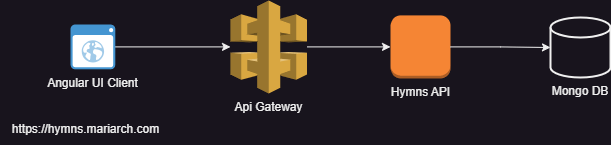
The simplest way to have implemented this was a single server architecture with a server side UI framework like freemarker or to serve single page architecture UI clients from within the same server. This will consume the least resources. But since I have the vision of creating mobile applications and exposing these APIs for collaboration with other teams, it made sense to isolate the frontend from the backend implementation using Rest APIs.
Cheap as Possible is The Goal
AWS offers a reasonable free tier offering that I aim to leverage in this exploration and ensure that I spend as little as possible in this initial stage. While cost reduction is a goal, I will be designing in such a way that my application can evolve whenever its needed.
Avoiding Provider Lock-in
One of my core principles of design in this application is to avoid adopting solutions that will make change difficult. Because I am still in the exploratory phase, I need to be able to easily migrate away from AWS to another cloud provider like Azure or GCP if I ever decided that AWS does not meet my needs. In order to be free to do this, I had to ensure the following:
- Use open source frameworks and standards and tools where possible and avoid proprietary protocols. A good example is integrating my UI client with Amazon Cognito using the standard OpenID protocol as opposed to relying heavily on AWS Amplify.
- Integrating with secret management systems like AWS parameter store and AWS secret manager using a façade pattern to ensure that other secret providers can be easily integrated to the application system.
Software Stack
- Angular 18
- Java 21
- Spring boot 3.3.2
- Nginx
- AWS
- Mongo DB
Mongo V Dynamo DB
I’m pretty sure you are wondering why I chose Mongo DB as opposed to Dynamo DB since I am exploring AWS infrastructure. Dynamo DB is not suited for applications with complex queries to the database. It is a highly efficient key value store. Hopefully I will get into more detail if I have a need for the Dynamo. Fortunately, AWS partners with Mongo Atlas to provide managed Mongo Atlas databases in the same AWS region.
EC2 – The Core
At the heart of AWS offering are its Elastic Cloud Computing systems it calls EC2 (I’m thinking C2 means cloud computing). These are simply virtual machines that you can provision to run your services. AWS provides a host of configurations that allows you to pick the operating system, resource and graphics requirements that you need. (I will not get in to that since AWS has an extensive documentation on this). AWS also provides the serverless version, ECS Fargate, that enables you to focus on our application code rather than the virtual machine. On a level above this, containers can be deployed through Docker, Amazon Elastic Kubernetes Service, or Amazon’s provision of the Openshift Red Hat Version. For this purpose, I used the simplest, the EC2 Amazon Linux virtual machine (the free tier configuration).
The Amazon Linux virtual machine is basically a Linux instance tailored for AWS cloud infrastructure. It provides tools to seamlessly integrate with the AWS ecosystem. You could do this on any other image version by installing the corresponding AWS tools.
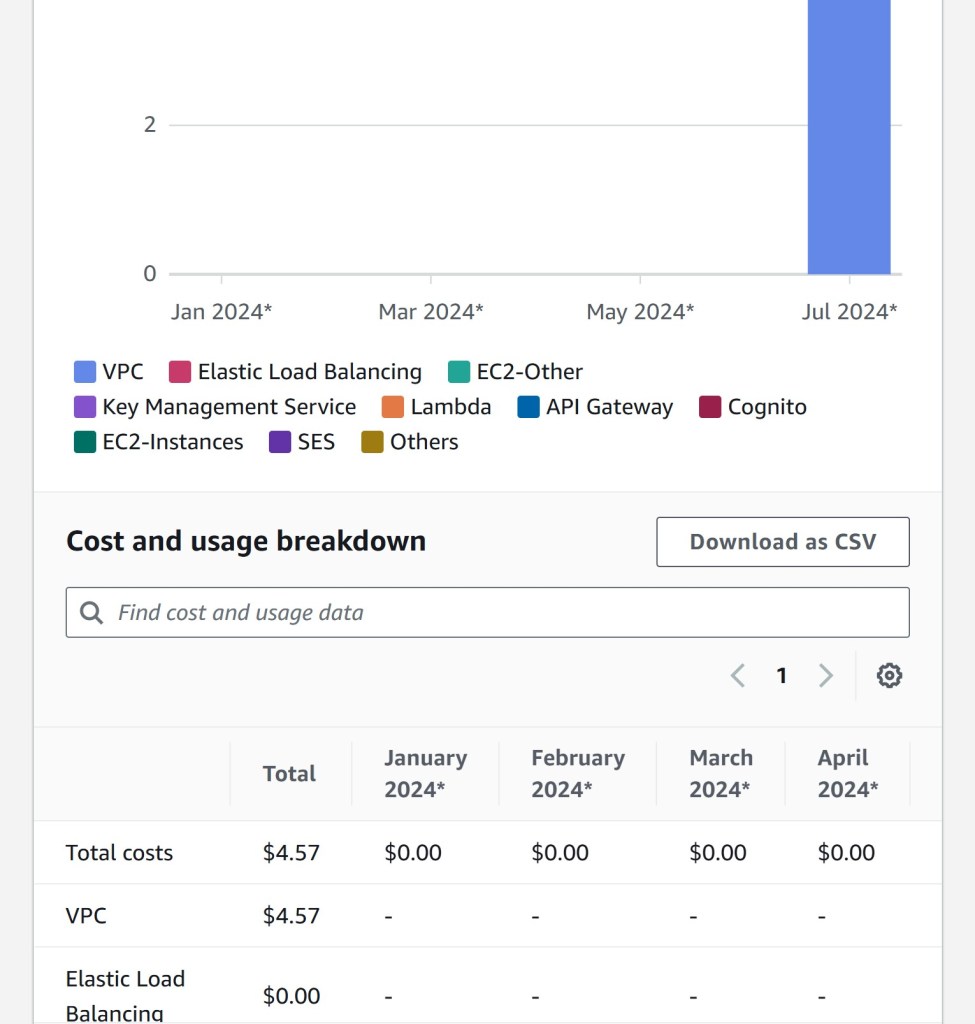
EC2 instances generally run in their own Virtual Private Cloud. This means that you cannot communicate with EC2 instances unless you add rules to grant access to specific network interfaces like protocols and ports. One interesting thing to note is that while AWS provides a free tier offering for EC2, it doesn’t for VPCs and you need a VPC for every EC2 instance. This means that you will spend some money running EC2 instances since they need to run within a VPC even if you are on the free tier. I have attached my initial cost breakdown for the first 2 weeks of use of AWS. We see that while I’m on the free tier and all services I use are still free, I still need to pay for the VPC.
Securing EC2 Instances
A VPC is defined by its ID and a subnet mask. Subnet masks are what is used to decide what IP addresses are used for that network. EC2 allows you to configure security groups that define who gets to access what interface of the virtual system. Security groups are reusable. They allow you to define multiple network access rules and apply these rules to different AWS components like other EC2 instances or load balancers. A network access rule comprises of the following:
- A type (e.g. HTTP, SSH, e.t.c)
- A network protocol (TCP, UDP)
- A port
- Source IPs (These can be defined by selecting VPC ids, or entering subnet masks or IP addresses).
As a rule of thumb, always deny by default, and grant access to components that need that access. Avoid wildcard rules in your security group.
Another aspect of securing EC2 instances is granting the instance permission to access other AWS services. In my application, I needed to retrieve deployment artefacts from AWS S3 in order to install them on the EC2 instance. To achieve this, the EC2 instance needs to be able to pull objects from S3. As discussed in the previous post, AWS provides a robust security architecture that ensures that all components are authenticated and authorized before they can access any AWS service. This includes EC2 instances.
IAM Roles enable AWS components to access other AWS services. EC2 instances can be assigned AWS roles. This ensures that the credentials corresponding to the assigned roles are available for processes to use in that virtual environment. In IAM, you can configure a set of policies to be associated with an IAM role. Please check out the IAM documentation for more details.
Routing Traffic to EC2 Instances
Because EC2 instances run in their own sandbox, they cannot be accessed externally without certain measures. In the next post will go through three basic approaches:
- Simplest – Exposing the EC2 interface to the outside world
- Using an application load balancer
- Using an API gateway and a network load balancer.
 Simply Gerald
Leave a comment