
Introduction
We spent our first weekend in July in Center Parcs Longford, Ireland; a truly exciting and fun filled resort (fun for the kids, I was just playing aggressive catchup). We did a lot of swimming and playing with water and so did a million other people. When we came home, we started feeling the effects of being exposed to different environmental conditions. I fell sick, my son fell sick… and I think it has only just begun. Perhaps if I had been a bit more vigilant and prepared for these conditions (if that was possible).
This is how the concept of security is. Most people think security is about “preventing bad actors from damaging our system”. Yes, that’s one aspect. But it also entails being vigilant and watchful. It involves guarding yourself from – surprisingly – yourself. The last point is crazy right? But think about it. How many of us has left their child alone and the child opens the window (imagine if the window doesn’t have a child lock). How many of us has accidentally deleted a resource or configured something that we have no business configuring? If we simply didn’t have that access, that would not have happened.
AWS was built with security in mind and that is one of the reasons it excels so much and can be used for mission critical and sensitive applications. In this blog, and the other blogs in this series, I will not be going through what AWS already has in its documentation – It has extensive and well-formed documentation and guides for all its services. Rather, I will be going through what I call the “spirit, essence and use cases” for these aspects. This will enable you to have a high level understanding of these concepts before perusing the documentation.
AWS Approach to Security
My approach is simple, since we are not perfect and we make errors (some mistakes, some malignant), we need to be vigilant and guard ourselves, keep track of these errors we make so we know how to fix and prevent them. AWS seems to think in the same vein and has developed lots of services tailored to all aspects of security. Some of their guiding principles are:
1. Audit – all actions any one or machine makes are logged and can be tracked.
2. Least privilege access – Customers, employees and services can be given access to only what they need, at the time they need it and nothing more than that.
3. Universal Identity and hierarchies – Identities are uniform and can be grouped in such a way that policies are applied and enforced uniformly.
4. Separation of customers from workforce – Authentication and authorization flows, while they are conceptually the same, are different for customers and employees. This enables security flows tailored to improving customer experience for customers.
5. Zero trust architecture – This ensures that the authorization of customers, employees and services are checked immediately before a resource is accessed.
6. Relationship between identity and billing – All users are directly tied to AWS accounts which are used by AWS for billing. Because of this relationship, it is easy to track what resources are being used by which AWS account.
Authorization Approach
AWS authorizes all requests before they are processed to achieve a zero trust architecture. In a typical flow:
1. The client logs in and is authenticated.
2. The client makes are request to access a certain resource
3. AWS obtains the security context of this request. This context contains everything about:
a. The user
b. The AWS account behind that user and its associated organization hierarchy
c. What the user is trying to access
d. The user’s privileges
4. AWS evaluates the security context against a set of policies. These are rules that specify whether to allow or deny a specific request. A policy contains the following:
a. The resource pattern (to match the resource uri of the request)
b. The action e.g S3:ObjectDelete ( to delete an object on S3)
c. Set of conditions (expressions that specify when this rule should be used)
d. The effect property (Whether to allow or deny a request)
5. In a list of polices to be executed, the first matched policy is used and the request is either “Allow”ed or “Reject”ed based on the value of the Effect property.
The policy syntax allows us to achieve the following kinds of restrictions:
1. Allow all S3 actions for resources starting with “project-a/” if the user’s project is “project-a”
2. Allow all S3 actions for all resources if the user’s role is SystemAdmin
3. Deny all S3 actions for all resources if the role is Accouting
Account and Billing
If you are thinking of using AWS, you likely belong to an organization; a startup; or you are an individual looking explore or develop something. The simplest use case is the individual working on a project. In this case the individual is the sole contributor and manager of that project. This user can simply create an AWS account and use this account to create and manage resources. However, in large organizations, it becomes tricky. Many organizations and businesses have different departments or sections each with their own budget and financial accounting requirements . Also these different departments may or may not use the same AWS services. Even if they use the same aws service i.e AWS S3, they will likely use different resources (i.e buckets in this case). In special cases, departments may even be required to share resources. AWS needs to provide a flexible, secure and transparent way of organizing these kinds of access requirements.
The unit of billing and resource ownership is the AWS account. IAM Users and Resources are created under an AWS Account. This is how AWS knows “who” to bill for certain resources. IAM users are created and associated to accounts. But these accounts can be grouped logically in a nested manner so that the organization can have a top-down overview of the expenditure of the organization. This is where AWS Organizations come in.
AWS Organizations enable us to use and manage multiple AWS accounts in the same organization. Multiple accounts can be grouped together so that polices can be administered uniformly on accounts in these groups.
When you enable AWS Organizations, one organization is created for you called the “root”. You can create new AWS accounts or invite existing AWS accounts to this organization. One or more organization units can be created to group one or more accounts. An organization unit can comprise of multiple accounts and organization units.
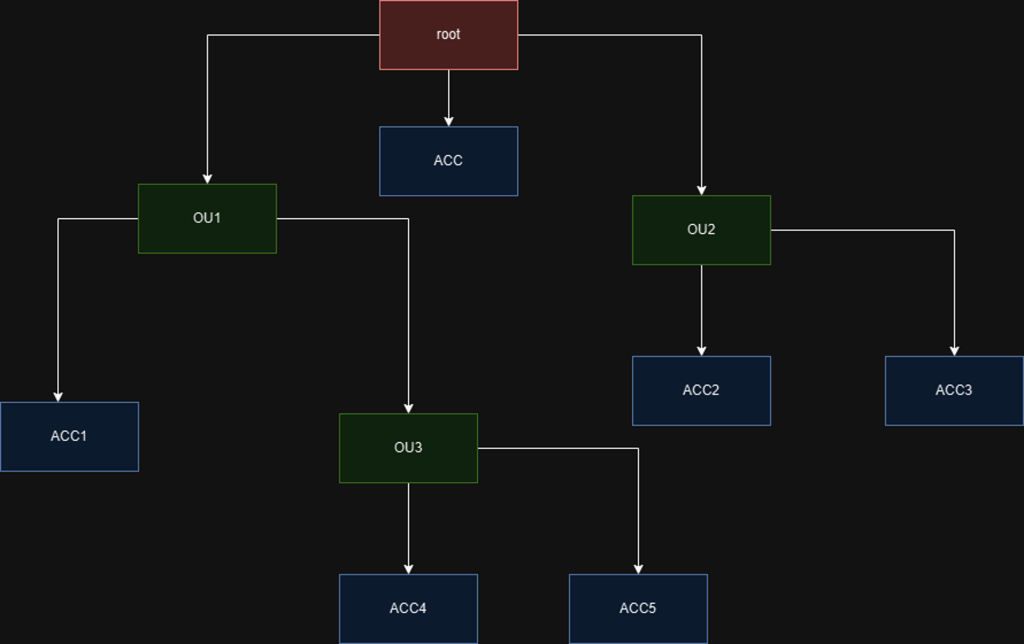
In the example above, we created 3 organization units and 6 accounts.
- The organization unit OU3 has OU1 as parent
- The accounts are distributed to each organization unit (shown in blue)
- There is always going to be one account ACC that is directly associated with the root organization and this is the management account. The management account is ultimately where all bills go to but AWS categorizes the bills according to the individual account use.
In addition to billing, AWS organizations helps to ensure that each accounts can only use a specific AWS features. By defining service control policies (SCPs) and attaching these profiles to an account or organization unit, we are able to limit what AWS feature a particular account can use. AWS has a lot of features and I am sure that organizations do not want all departments to be able to utilize all the features that AWS has to offer. What they typically would do is specify a list of features that a particular department can use. Once an account is granted access to these features then users can be created under these accounts and granted permissions to use those features.
For example, supposing ACC4 and ACC5 are only allowed to use AWS S3 ( I don’t know why I keep using this, but let’s just play along), we can define an SCP that grants access to only S3 service and attach this SCP to the OU3 organization unit. This way, both ACC4 and ACC5 accounts are restricted accordingly. If IAM users are created with ACC4, they will only be able to grant them S3 specific permissions. In detail:
- ACC4 can create an IAM User User 1 and grant permission to read from S3
- ACC5 can create an IAM User user 2 and grant permission to write to S3.
- ACC4 cannot grant User 1 a permission to access Amazon SNS because the SCP only allows using S3 permissions
- ACC4 cannot grant User 2 permission to access Amazon SQS because the SCP only allows using S3 permissions.
In addition to Service Control Polices (SCPs), other policies can be created and attached to organization units and accounts:
- AI services opt-out policies – control whether AWS AI services can store or use your content
- Backup policies – Enforce consistent backup plans
- Tag policies – Enforce a certain standard of tagging for all resources. You can define keys and their allowed values.
Identity and Access
There is a distinction between an AWS account and a User. Accounts are associated with resources and are used to create Users. In AWS, there are two kinds of users: root users and IAM users. Root Users are users automatically created and associated with the AWS account.
IAM Users are created in IAM or IAM Identity Center and these are associated to an AWS account. One or more IAM users can be created for an account. IAM Users are typically humans (organization staff) or machines that access any of the resources created in your account.
It is worth noting that AWS discourages the use of the root user for things that can be done with an IAM user with a correct privilege. They advise that the root user should be used for actions that only a root user can perform. The credentials for the aws account should be securely managed.
The IAM Identity Center enables administrators to manage IAM users and groups across the organization. These users have to be assigned the following:
- An associated AWS account
- One or more permission sets (specifying what the user can perform in that account).
Each permission set the user is assigned can be seen as a designated role. The Identity center provides a link to an access portal to enable users access the management console with any designated role. Assuming the user has the “developer” and “director” permission sets assigned, the user takes the following steps:
- Clicks on the portal link
- Enters the username and password
- The user is redirected to a page listing all the aws accounts the user has access to and the permission sets. The user can click on either “developer” or “director”. By clicking one permission set, the user is redirected to the management console and can use the management console as a “developer” or a “director”
- On the management console, the user can see which user and designated role is being used.
AWS also has a guide for this.
Conclusion and Thoughts
AWS has robust mechanisms for handling security and ensuring that you design your systems with security in mind. By using Amazon CloudTrail, you can monitor AWS account activity as well. AWS Organizations enable you to structure your accounts and billing to tailor that of your organization.
AWS has the IAM and the IAM Identity Center for managing access (i.e creating users, groups and assigning permissions). They are similar in use case and AWS advices to use the IAM Identity Center as much as possible because it facilitates configuring access at an organization level. This ensures that you have a uniform and transparent access enforcement system. With this, we can efficiently enforce access for our workforce.
To manage customer access, AWS provides AWS Cognito and AWS Verified Permissions. These two systems are so broad and powerful that they deserve their own section.
 Simply Gerald
Leave a comment